Pearl Knot
Classic Elegance
A pearl-white floral gate tied with satin opens into a moonlit garden, leaving a clear indigo sky for the couple's invitation details.
₹599₹99940% off
Create one elegant link for your story, ceremonies, venue map, photos, and guest replies.
RSVP reply
Guest confirmed
Share-ready link
Live in minutes
Most loved designs
Choose a style now. You can change every detail later, and our team can guide you one-to-one even on the free plan.
Classic Elegance
A pearl-white floral gate tied with satin opens into a moonlit garden, leaving a clear indigo sky for the couple's invitation details.
Classic Elegance · Muslim
Powder-blue palace doors carry guests into a luminous courtyard, where circular shuttered windows open on scroll to reveal every celebration.
Classic Elegance · Sikh
A mobile-first rose-gold invitation whose cinematic scroll opens into the hero, then unrolls every celebration with tactile parchment transitions.
Classic Elegance
A moonlit aubergine palace comes alive as champagne light travels through a crystal chandelier, revealing an intimate royal invitation.
Vintage Romance · Hindu
A cinematic ivory-and-sage heritage invitation that opens through palace gates into a peaceful garden and carries a scratch-to-reveal date, program timeline, and guest essentials.
Floral · Christian
A light, airy garden invitation: a wax-sealed envelope blooms open into a filmed blush-and-ivory garden hero, with a scroll-drawn story, framed event blooms, and a petal-burst RSVP.
Classic Elegance · Muslim
An ornate gold-and-emerald Niqah invitation with Framer motion, elegant typography, and a cinematic celebration flow.
Vintage Romance · Muslim
A theatrical wine-and-gold invitation that parts a velvet curtain to reveal the couple, with spotlit vignettes, a filmed hero, and a scratch-to-reveal date.
Visual builder
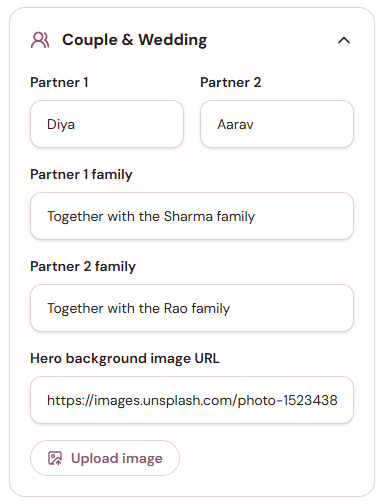
Add couple names, family lines, hero photos, events, gallery images, venue map, music, colors, and languages in a simple guided editor. Your invite keeps looking premium while you keep control, with one-to-one help available even before you pay.
No complicated setup
Choose a design that feels like your wedding.
Add your story, events, photos, venue, and colors with one-to-one help available.
Publish when ready, with support available even on the free plan.
Everything in one link
Give guests every detail they need, keep replies organized, and get one-to-one help even on the free plan.
Add Haldi, Sangeet, Mehendi, Varmala, reception, and more.
Change colors, photos, names, venues, and every important detail.
Guests open one link. There is no app to install.
Message us while you build. We guide free-plan users too.
Help every guest find the celebration without extra messages.
Send it on WhatsApp, Instagram, email, or as a QR code.
Coverage
Inspired by modern invitation hubs: event details, maps, music, RSVP, galleries, a language-friendly guest experience, and real one-to-one support even for free-plan users.
Multi-language invites
Reviews
Our families loved that every ceremony had its own animated card. Sharing one link on WhatsApp made everything so simple.
Ananya R.
The invite felt premium and the RSVP replies saved us so many calls. Getting one-to-one help on the free plan made setup easy.
Farhan K.
We changed event images ourselves and published in minutes. The team still guided us personally, even before we paid.
Meera S.
Start with a self-serve invite or request a custom experience. Either way, one-to-one support is available, even on the free plan.
Self serve
Pay once when you are happy. Includes the invitation link, all events, venue map, RSVP, animations, QR sharing, and personal support while you build.
Custom
Includes a one-on-one call, 24x7 support, and modifications. Pricing is discussed after understanding your invitation needs.
FAQ
Answers for couples comparing online wedding invites, RSVP websites, multilingual invitations, custom digital wedding cards, and free-plan one-to-one support.
InviBloom is a digital wedding invitation builder for creating animated wedding invite links with event details, gallery, RSVP, maps, music, and mobile-friendly sharing.
Yes. One-to-one support is available even on the free plan, so you can ask for help while choosing a template, editing details, or preparing your invite.
Yes. You can add Haldi, Mehendi, Sangeet, Varmala, wedding ceremony, reception, and custom events with dates, venues, images, and descriptions.
Yes. InviBloom supports English, Hindi, Urdu, Tamil, Telugu, Kannada, Malayalam, Bengali, Gujarati, Marathi, and Punjabi, with manual translated content fields in the builder.
Yes. You can enable RSVP so guests can respond from the invitation link and you can review replies in your dashboard.
Yes. Each published invitation is a share-ready link that can be sent on WhatsApp, Instagram, email, or used with a QR code.
The self-serve gallery supports up to 20 photos. Larger custom galleries can be requested through the custom plan.
Yes. You can save drafts, update details, change styles, and edit content before publishing. Published invitations can also be updated from your dashboard.
Wedding planning journal
Practical answers for wording, timelines, guest details and digital invitation etiquette.
A calm, practical timeline for announcing your date first—and sharing the full celebration details when they are truly ready.
How to turn a beautiful invitation into a genuinely useful travel companion for every guest—from the first announcement to arrival day.
A designer-minded guide to turning taste, story and tradition into one coherent invitation—without sacrificing clarity for decoration.
Choose a template, add your details, and share a digital invite your guests will remember. If you need help, one-to-one support is available even on the free plan.
Choose my template